Technical foundations
Architecture, databases, custom domains, custom events, goals, funnels, and API access.
Architecture
Separated by design
Eurolytics separates event ingestion from the dashboard. The ingestion service is a stateless Go binary that accepts events, classifies traffic, and writes to ClickHouse. The dashboard is a Next.js 14 application that reads from ClickHouse and manages accounts via PostgreSQL. The two share no runtime dependencies.
INTERNET
┌──────────────┴──────────────┐
▼ ▼
events.eurolytics.app eurolytics.app
Go + SQLite WAL Next.js + Postgres
└──────────┬──────────────────┘
▼
ClickHouse
Data Layer
ClickHouse for speed, Postgres for structure
ClickHouse
Columnar OLAP database optimized for time-series analytics
- All pageview and event data
- Aggregations and trend queries
- Partitioned by site_id for fast queries
PostgreSQL
Relational database for structured metadata
- User accounts and authentication
- Site configurations and team membership
- Goals, funnels, and conversion definitions
- Bot pattern definitions for classifier sync
Bot filtering
Bots are classified, not counted
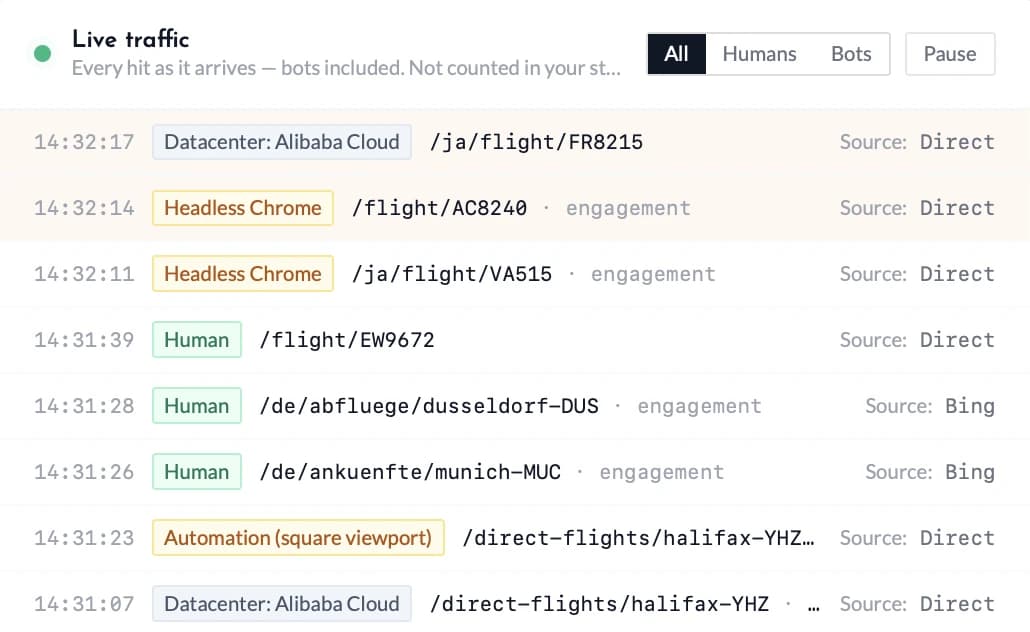
Every hit is classified on arrival — headless browsers, datacenter IPs, and automation patterns are labeled and kept out of your human stats. The live traffic feed shows the raw stream, classification included, so you can see exactly what was filtered and why.
Tracking
Custom events, goals, and funnels
Beyond pageviews, Eurolytics tracks custom events you define — sign-ups, purchases, button clicks, or anything else. Create Goals in your site settings to track conversion rates, and build Funnels (2-8 steps) to see where visitors drop off in multi-page flows.
eurolytics('signup_complete', {
plan: 'pro',
source: 'landing_page'
})
Domains
Custom tracking domains via CNAME
Point a subdomain like analytics.yoursite.com to our ingestion endpoint via CNAME. Requests are served from your own domain, which gives you more complete and accurate measurement.
Configure it in Settings → Tracking Domain. DNS verification is built in — add the CNAME record and Eurolytics confirms it automatically.
API
Programmatic access
Eurolytics provides API access for querying analytics data, managing sites, and creating goals programmatically. You can export data via the dashboard in JSON format at any time.
Common questions
What's the tracker script size?
Just 1.2KB gzipped. That's tiny by modern standards, smaller than a thumbnail image. The script loads asynchronously and has zero impact on your page speed or Core Web Vitals. Perfect for high-performance sites.
Do you offer an API?
Yes. The Stats API lets you query aggregate stats, timeseries, and breakdowns with a Bearer API key, and the v1 API can create sites and fetch tracking snippets programmatically. There is also an MCP endpoint, so AI assistants can add sites, retrieve the tracking code, and pull stats directly. Create API keys in Settings.
Do you support custom domains (CNAME)?
Yes, we support custom tracking domains via CNAME. Point a subdomain (e.g. analytics.yourdomain.com) to events.eurolytics.app, verify DNS in Settings → Tracking Domain, and your snippets automatically use the first-party domain for more accurate measurement.
Can I track custom events?
Yes. You can define custom events (sign-ups, purchases, etc.) in the dashboard, and our JavaScript tracker sends them automatically. Create Goals in Settings -> Goals, and Eurolytics will start tracking and displaying conversions.
What databases do you use?
ClickHouse for analytics (fast OLAP queries, time-series optimized) and PostgreSQL for metadata (user accounts, site configs, team membership). We deliberately kept these separate so ingestion can run independently.
